Which passkey is which?
Open the security settings of almost any account that supports passkeys, and you’ll see a list of the passkeys you’ve created. Ideally, each one says where it lives, such as "Dashlane," with our logo next to it. It's less common than it used to be, but you may still see "Passkey 1," "Passkey 2," and a generic key icon.
That label matters because passkeys can live in several places: your phone, your computer's built-in password manager, or a password manager like Dashlane. Seeing which one holds each passkey gives you peace of mind and a clear picture of where your logins are. It's what keeps passkeys simple rather than confusing.
Getting that label right depends on a piece of passkey plumbing most people never see. That plumbing now has an official home, and Dashlane is listed in it.
A 16-byte name tag
Every time you create a passkey, the provider that stores it hands the website a short identifier called an AAGUID (Authenticator Attestation Globally Unique Identifier). It’s 16 bytes long, and every passkey Dashlane creates carries the same Dashlane AAGUID.
On its own, an AAGUID is just a string of hex characters. To turn it into "Dashlane" and a logo, a website needs a trusted directory that maps each AAGUID to a name and an icon. Without one, every passkey looks the same.
How the community filled the gap
The FIDO Alliance has long run a Metadata Service (MDS), a signed directory of authenticators that websites download and trust. For years, it was built around hardware security keys and devices, and it had no way to list software password managers like Dashlane.
So the passkey community built a stopgap. Tim Cappalli, an editor of the W3C WebAuthn specification and co-author of whatarepasskeys.info, created a shared list on GitHub that mapped password manager AAGUIDs to names and icons.
Providers added themselves through pull requests, and websites around the world used it to label passkeys. Dashlane was part of that list, and we're grateful to Tim and everyone who contributed for keeping passkeys usable while the official path was being built.
The list was always meant to be temporary, and that moment has come. In late September 2026, FIDO opened its MDS to software credential managers. The community project has since been officially deprecated, with FIDO's Convenience Metadata Service (C-MDS) now the authoritative source for passkey provider names and icons.
Our name tag, now on the record
Dashlane's entry went live in the FIDO MDS on September 30, 2026, one day after FIDO enabled credential manager listings. That makes Dashlane one of the very first password managers to complete the move.
Our entry tells websites three things: our AAGUID, our name, and our logo in light and dark versions. Any site that uses FIDO's directory can now show "Dashlane" next to your passkeys, using information that comes straight from the standards body rather than a community workaround.
The listing is an official, maintained record of who we are as a passkey provider, not a security certification. It's the foundation for a consistent passkey experience across every site you use.
What this means for you
You don't need to do anything. As more websites adopt FIDO's directory, the passkeys you create with Dashlane will be labeled clearly and consistently with the Dashlane name and logo, instead of a generic key.
That makes it easier to see at a glance which passkeys live in your Dashlane vault, tidy up old ones with confidence, and trust that the passkey you're using is the one you expect.
Try it yourself. Open the passkey settings of an account where you've saved a passkey with Dashlane and look for our logo.
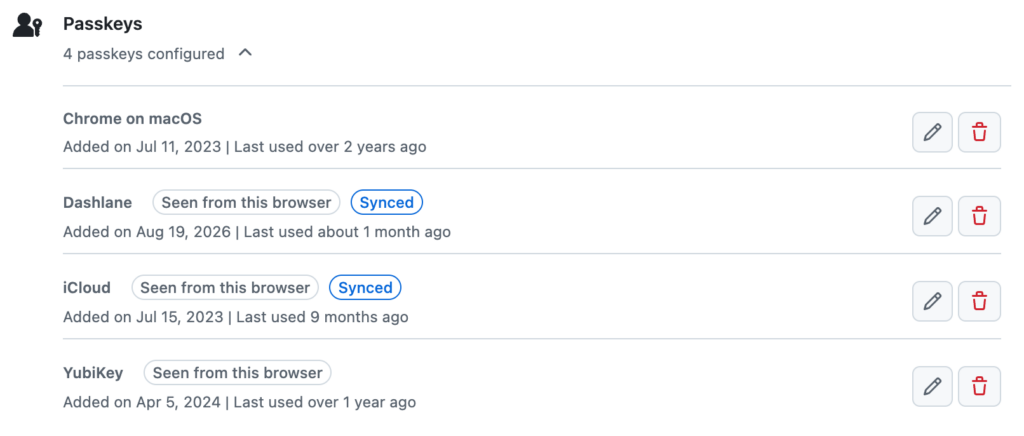
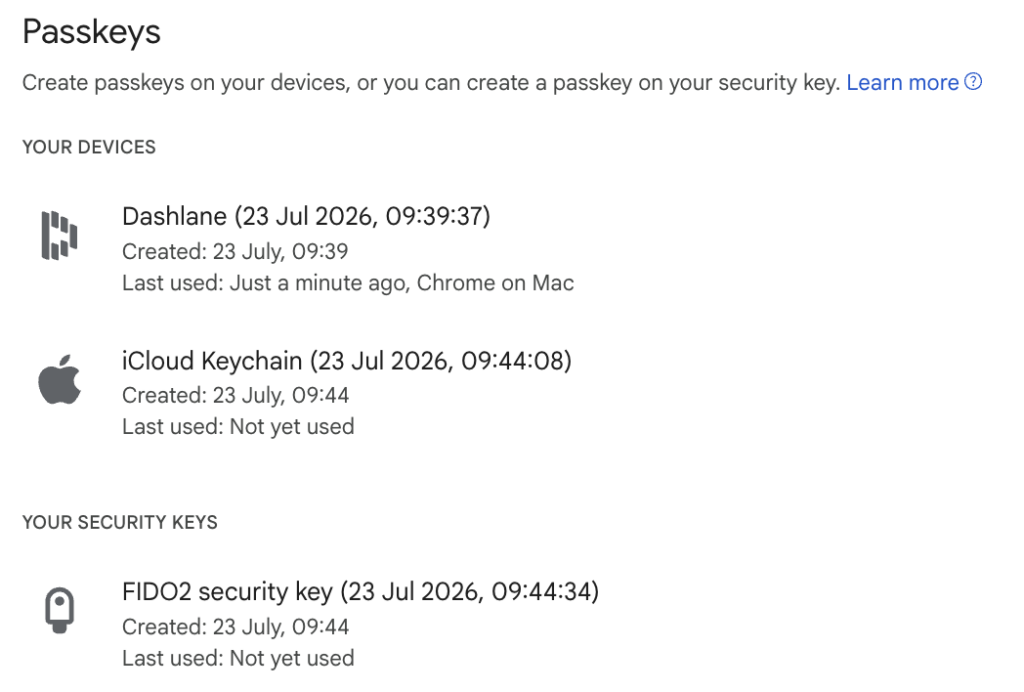
Below, you’ll see how this looks today on GitHub and Google. Each passkey is labeled with the provider that holds it, so a Dashlane passkey is easy to tell apart from ones in iCloud Keychain, Chrome, or on a security key.
For developers: moving to FIDO's directory
If your site supports passkeys and shows provider names, FIDO's C-MDS is now the place to look them up.
The community maintainers have published guidance for the transition. If you rely on a passkey vendor, it's worth asking whether they've made the switch.
What we're building next
Listing in MDS is one step in a longer commitment. Dashlane has supported passkeys since 2022, and our engineers have made major contributions to the FIDO Alliance's Credential Exchange specifications, the standard that lets you move passkeys between providers. Two newer features are next on our list:
- Conditional Create. After you sign in to a site with a password from Dashlane, the site can create a passkey for you in the background, with no extra setup screens. It's the easiest path from passwords to passkeys we've seen.
- The Signals API. It lets a website tell Dashlane when something changes, such as a passkey you deleted on the site or a username you updated. Your vault stays in sync, so you're never offered a passkey that no longer works.
We're actively building support for both.
The next puzzle: passkeys that move
Passkeys are no longer locked to the provider that created them. With credential exchange, you can move your passkeys from one password manager to another securely and without re-registering on every site. That's a big win for user choice, and Dashlane is proud to have been the first credential manager to support this capability on iOS and Android.
It also means a passkey can live in more than one place, just like a password saved in two apps. That's normal, and passkeys stay just as resistant to phishing wherever they live. The provider name that a website shows you may not match though. A website learns a passkey's AAGUID only once, when the passkey is created. If you create a passkey in another app and later move it into Dashlane, the site will keep showing the old provider's name, and the reverse is also true. The label reflects where the passkey was created, not where you use it today.
Fixing this requires a change to the standards, so websites can learn which provider holds a passkey today and when it was last used. This is currently planned for the subsequent version of WebAuthn. Dashlane is ready to support these changes as the specification evolves because passkeys should be labeled correctly wherever they live.
An evolving technology, built together
Passkeys are still young, and they keep getting easier to adopt, easier to manage, and now portable between providers. Each step depends on unglamorous work behind the scenes, like a reliable directory of who's who.
Dashlane is investing in that work. Our listing in the FIDO MDS is one part of it, and Conditional Create, the Signals API, and support for future spec changes come next.
Sign up to receive news and updates about Dashlane