[Jul 2026] What’s New at Dashlane: Enhanced Activity Log Metadata, Confidential Provisioning Without SSO, and More


In this monthly roundup of our latest product updates, check out how we delivered more value to organizations in July 2026.
More detailed Activity Logs for faster incident response
Activity Log entries now include enhanced metadata: IP address, geolocation (country, city, and coordinates), device context (OS, browser, device access key), and an autonomous system number (ASN).
For every client log, admins can see who, what, when, where, and from which device, all from the Admin Console’s Activity Logs page. They can reliably correlate suspicious events and support incident response, even when operating with a zero-trust framework. No more working blind on attribution.
Confidential Provisioning without turning on SSO
Admins can now run Confidential Provisioning with SCIM, even without enabling SSO.
For teams that keep their most critical vaults on Master Password so that a single IdP outage can never cut employees off from the credentials they depend on, this update means they no longer have to choose between that resilience and automated provisioning.
Any team can now get faster onboarding, cleaner offboarding, and no orphaned accounts through Confidential SCIM, without switching from Master Password to SSO.
A clearer view of your Credential Protection rollout
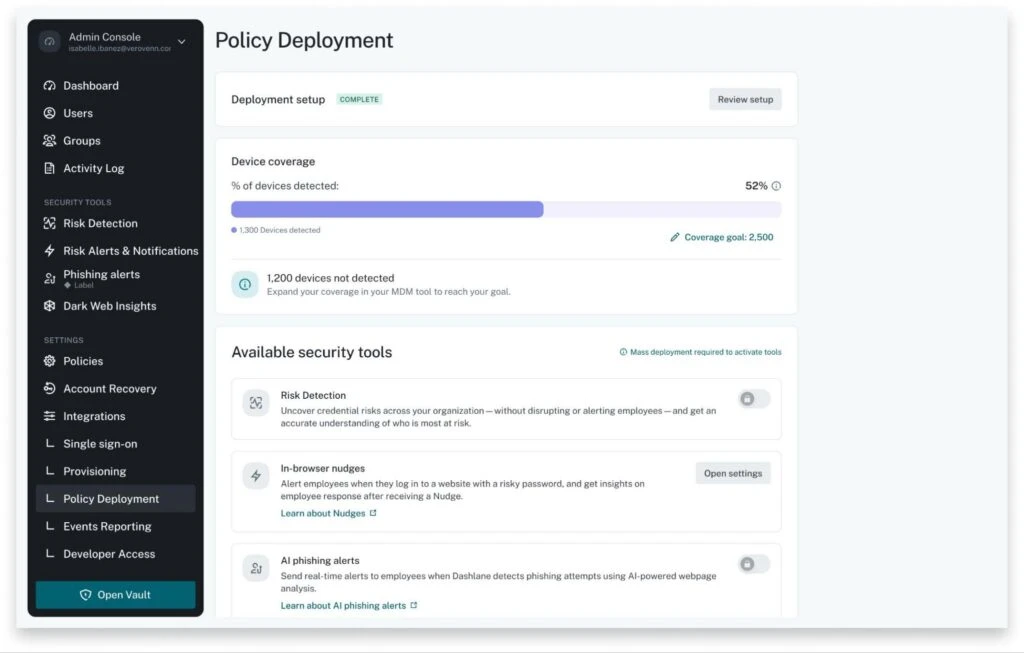
Already rolled out the Credential Protection policy to part of your organization? With the new Device Coverage view in the Admin Console, you can see exactly how many extensions have the policy applied. Thus, you can determine how many devices have Credential Risk Detection, Credential Risk Alerts & Notifications, and AI Phishing Alerts available.
Every account also gets a next step suited to where it currently stands: Finishing initial setup, waiting for the policy to sync, or confirming full coverage has already been achieved.
For admins running a phased or partial rollout, Device Coverage replaces guesswork with a number you can act on every time you log in. It's a live read on how much of your organization is actually protected.
One-step Credential Protection deployment for managed Windows devices
The easier policy deployment is, the faster your whole organization actually gets covered. New one-step policy deployment for Credential Protection lets IT admins roll out the Dashlane browser extension to every managed Windows device in a single action. No manual sequencing required.
The extension installs silently in the background, so employees are protected without seeing a prompt or taking an action. The moment it lands, credential protection turns on and risk insights start flowing in.
Less setup friction for IT means security visibility reaches everyone sooner, not just the devices that made it through a multi-step process.
Admins can review the beta setup in the Admin Console under Policy Deployment.
Sign up to receive news and updates about Dashlane