Introducing Vault Enforcement: Close the Adoption Gap on Your Terms


Admins can now mandate password manager adoption for sensitive apps to ensure users log in with secure credentials
An enterprise password manager is a critical first step in securing employee credentials. But password managers fall victim time and time again to the same thing: the adoption gap.
You know the story. IT and security teams roll out a password manager, and six months later, an employee still types the company's cloud infrastructure password straight into a login form because that account sits outside single sign-on (SSO) and nothing requires the password to be stored in a secure password vault.
To address this risk, we’re introducing Vault Enforcement, which lets admins require employees to log in through Dashlane for their most important apps. Instead of waiting for employees to change their cybersecurity behavior, admins can use Vault Enforcement to immediately protect sensitive credentials.
Dashlane is the first credential manager to enable admins to enforce vault adoption, advancing password management into proactive credential security.
What is Vault Enforcement?
Vault Enforcement is a solution to the adoption problem that works by enforcing the use of Dashlane on admin-defined websites through a policy-deployed browser extension.
Admins can leverage this policy to support different rollout strategies with less time and effort, depending on what your organization is solving for.
1. Drive full-company adoption. Enforce secure logins on the websites most employees already use every day, turning occasional use into full use without a training push or a wave of reminder emails. Prime examples of websites to enforce vault usage on are an internal knowledge base or project management app.
2. Start with specific teams and departments. Enforce login on the websites a specific team uses, so that team adopts the vault before the policy expands company-wide. For example, add a SIEM portal to the Vault Enforcement list to target your Security team, then hubspot.com when rolling out to the Marketing department.
3. Protect the highest-risk accounts. Enforce vault login on admin consoles, cloud infrastructure, and finance tools not gated behind SSO (or even SSO apps that employees can still access with a legacy password). This way, accounts where a breach would be most damaging are protected first.
Aren’t apps secured by SSO?
A key use case for Vault Enforcement is securing critical apps that are not behind SSO. These are the highest-value targets, because a standalone username and password is likely the only thing protecting them. On average, 37% of corporate applications are not managed by SSO which leaves a critical access gap, especially when password management adoption is low.
Based on anonymized, aggregated Dashlane telemetry, here are the top 20 business apps where users most often autofill a saved password directly rather than logging in through an identity provider:
| 1. salesforce.com | 11. github.com |
| 2. docusign.com | 12. dropbox.com |
| 3. xero.com | 13. jpmorgan.com |
| 4. adobe.com | 14. atlassian.com |
| 5. netsuite.com | 15. athenahealth.com |
| 6. thomsonreuters.com | 16. ups.com |
| 7. zoom.us | 17. box.com |
| 8. bill.com | 18. fedex.com |
| 9. concursolutions.com | 19. squareup.com |
| 10. mailchimp.com | 20. intacct.com |
All insights are derived from strictly anonymized, aggregated autofill event data. Dashlane can't view any individual user’s browsing activity.
Customer relationship management, productivity and collaboration, cloud storage and file transfer, developer, and finance and accounting apps make up the majority of most-accessed business apps, all of which contain sensitive data.
Seeing these apps high in our autofill data suggests that some companies haven't connected them to their identity provider, perhaps due to the SSO tax—when SaaS tools charge a premium for SSO login capabilities—or setup complexity. Others may have employees who continue to log in with legacy passwords created before an SSO integration.
While the majority of apps on the list above support SSO login, some other apps used for critical business functions do not support SSO at all. For critical services that can’t be (or simply aren’t) integrated with an identity provider, Vault Enforcement is the most direct way to control who gets in and what password they use because no other path exists.
How does Vault Enforcement work?
Deploy the extension
Deploy the Dashlane extension across your full organization first. That turns on Credential Risk Detection for every employee, running in the background with no employee-facing alerts and giving admins a full view of where credential risk concentrates.
Then, add the highest-risk sites surfaced by Credential Risk Detection to your Vault Enforcement list.
Enforce vault usage on specified domains
An admin adds a domain, like a shared cloud infrastructure tool, an internal admin console, or any of the services mentioned above, to the enforcement list. Admins can also add their company logo and support contact to the enforcement webcard and other employee-facing alerts, so an employee with a question about the policy knows who to ask.
Enforcement is blocked on your identity provider domain, so there's no path to locking your own team out of the tools that run everything else (and that employees need to log into in order to connect to their Dashlane vault). Admins can remove domains from the enforcement list at any time.
Note: Dashlane recommends turning on Just in Time Provisioning too because it automates account creation for anyone who has never logged in before. Just in Time Provisioning covers every employee on the extension, including those who haven’t set up a vault yet, speeding up vault rollout and saving time and effort for admins.
Automatically warn, then enforce vault usage
Vault Enforcement only activates on login or registration pages of enforced domains. This ensures that employees without credentials—for example, those performing market research or evaluating new SaaS tools—can do their job without interruption.
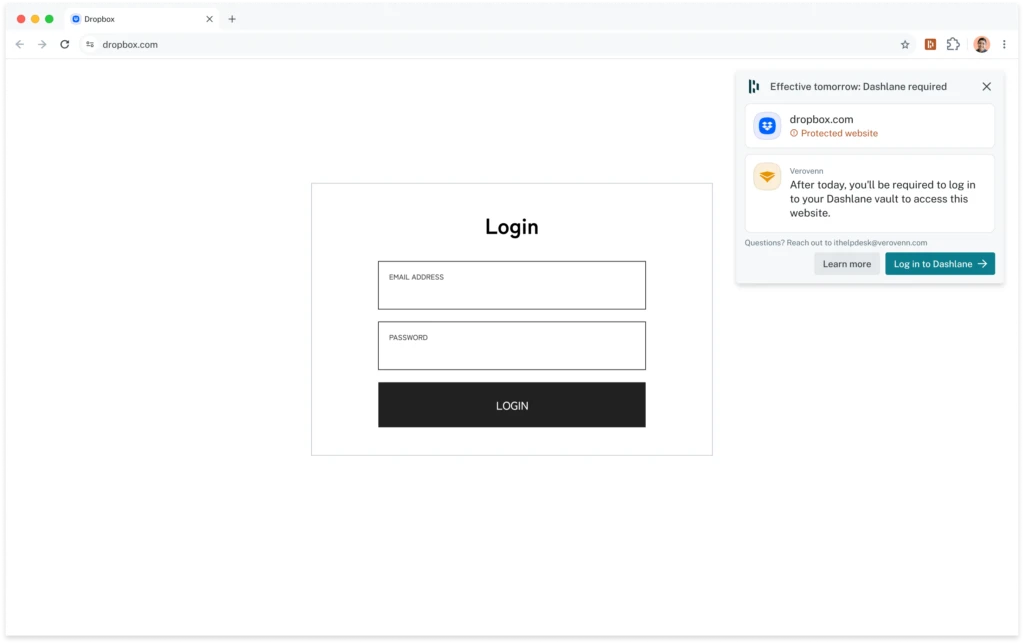
Instead of blocking plan members outright, Vault Enforcement initially warns employees, then automatically escalates to enforcement. The first day an employee reaches a login or registration form on an enforced domain without being signed into Dashlane, they see a warning webcard: "Effective tomorrow: Dashlane required."
The next day that employee visits the site, the webcard blocks the login or registration form: "Restricted access: Dashlane required," with a button to sign in.
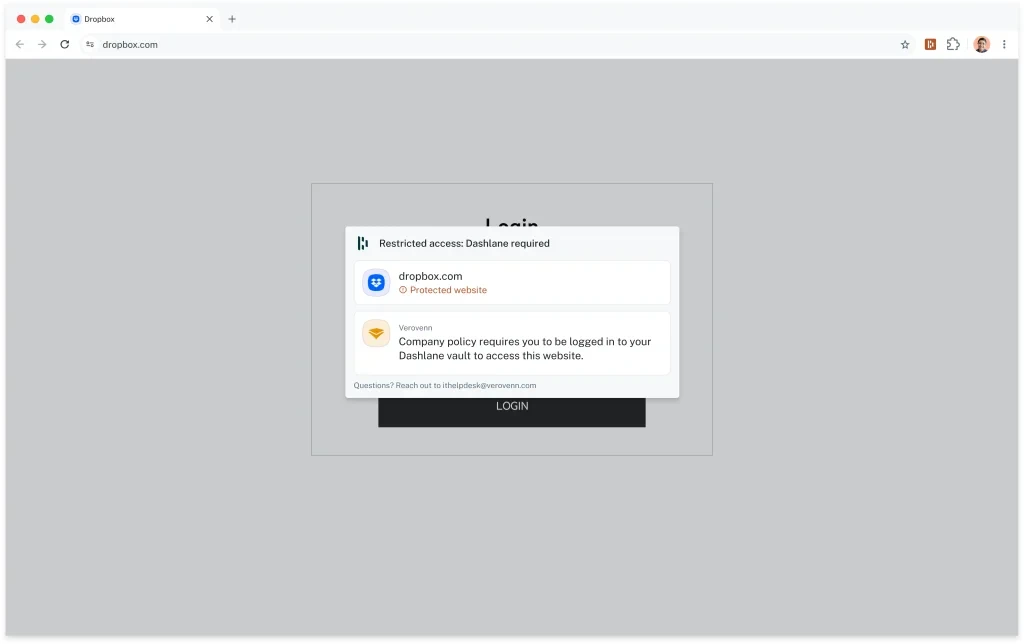
Signing into the vault takes one step. Employees authenticate through your existing SSO so there’s no Master Password to create or remember. Once an employee signs in to Dashlane, the webcard closes, opening access to the protected website. From there, AI-powered autofill kicks in to suggest and save credentials for secure, effortless logins.
Measure impact
In the Dashlane Admin Console, admins can track increased Dashlane usage by following activated and active user counts on the Insights Dashboard and Users page.
Admins can also check the Vault Enforcement page to see which domains are enforced and access Activity Logs for every employee who encounters an enforcement alert. Changes to the enforced domains list are also tracked in the Activity Log.
Remediate risk
Getting an account into the vault doesn't make the credential inside it safe. Credential Risk Detection flags passwords that are weak, reused, or already compromised, whether they are saved in the vault or still manually typed into a login form.
Credential Risk Alerts turns that flag into a fix, prompting employees to secure risky credentials without an admin chasing down each individual.
And AI Phishing Alerts stop credential theft through phishing attacks that bypass traditional phishing solutions like email filters, catching a fake login page or a malicious payment portal the moment an employee lands on it in the browser.
Vault Enforcement decides who gets into the vault. The features above decide whether the credentials in the vault or still outside it stay safe.
Vault Enforcement: Now in open beta
Vault Enforcement is available now in open beta for admins on the Omnix® Enterprise plan whose companies use Chrome or Edge and who’ve already deployed the extension by policy and enabled SSO. If your team meets those requirements, open the Admin Console and go to Vault Enforcement to add your first domain.
If you haven't set up policy deployment yet, that's the first step. It's what turns on Credential Risk Detection, which silently audits credential risk across your whole company regardless of whether you ever enable enforcement. See the deployment guide.
Vault Enforcement gives you a direct solution to the adoption gap. It pulls the highest-risk accounts into the vault on your terms, without waiting on company-wide habit change. In fact, it can even speed it up.
Open Vault Enforcement in your Admin Console, or talk to your Dashlane contact if you're not deployed yet, to close the adoption gap once and for all.
Sign up to receive news and updates about Dashlane