How Dashlane Solved the Zero-Knowledge Activity Log Paradox After 12+ Months


When we designed Dashlane Omnix®, our intelligent credential security platform, we made a fundamental commitment: Every piece of data, including activity logs, would operate on zero-knowledge principles. No exceptions.
We knew that real-time credential risk detection would generate massive volumes of sensitive data—employee logins, credential usage patterns, security events across entire organizations, and more. The kind of information Security Operations teams depend on is exactly what threat actors prize most.
But building truly zero-knowledge activity logs at scale is extraordinarily complex. Unlike vault data that stays encrypted on user devices, activity logs must be collected, processed, analyzed, and made searchable server-side—all while ensuring Dashlane itself cannot access the raw data. We needed to solve what seemed like contradictory requirements: Logs that are both fully encrypted and instantly queryable.
To our knowledge, no other credential security or identity management platform has achieved this. Most providers either compromise on encryption (storing logs in plaintext or with keys they control) or sacrifice functionality (limiting search, filtering, and real-time analysis). We refused both trade-offs.
After more than a year of engineering effort, we built an activity log infrastructure that delivers complete zero-knowledge protection while maintaining the performance and usability Security teams require. Here's how we did it.
Our mission: Elevating activity log security
To offer our enterprise customers an infrastructure for activity logs that is zero-knowledge and meets exceptionally high security standards, our solution had to address six critical goals:
- Encryption at rest: Log data must be cryptographically protected and useless to an attacker, even if the Dashlane infrastructure is breached.
- Encryption in transit: All log data must be fully encrypted while moving across the network to prevent interception.
- Encryption in use: This is the hardest to achieve. Dashlane must be able to process log data, but a Dashlane employee or a malicious actor must never be able to access or see log data from our customers.
- Insider threat: Logs must be secure even against actors with privileged access to our main server infrastructure.
- Integrity: We must ensure complete, consistent, and accurate recording of all events, even during system failures.
- Scalability: The system has to support fast, server-side analysis of large log volumes, all while strictly adhering to zero-knowledge privacy principles.
Meeting these requirements necessitated the invention and development of a specific infrastructure and data pipeline leveraging our expertise with confidential computing.
Our approach: Building a secure activity log infrastructure
We built upon the Dashlane Secure Cloud, our confidential computing infrastructure powered by AWS Nitro, that we had previously developed to handle third-party integrations, such as Confidential Single-Sign On (SSO) and Confidential Provisioning with SCIM.
With that infrastructure as a starting point, we created an architecture based on cloud secure enclaves to isolate sensitive log data from both external attackers and potential internal threats that provides:
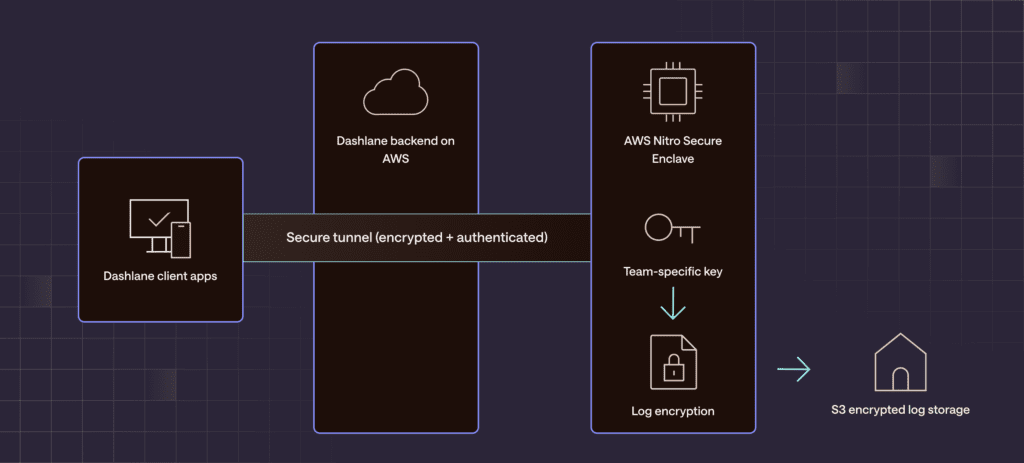
- Complete, isolated log encryption: All log data is encrypted with team-specific keys that are only accessible within the secured enclaves. Log decryption can only be performed inside the secure enclave.
- Secure communication for logs: We moved the server API endpoints responsible for storing and retrieving logs into the Nitro enclaves. And we utilized our existing secure tunnel capability to create a private communication channel between client apps and the enclave. This ensures all log data remains encrypted while in transit and is never decrypted on our standard server infrastructure.
- Secured admin access: To provide admins with secure log access, we leveraged the same secure tunnel. Logs are decrypted inside the enclave and then sent back to the authorized admin via the secure tunnel, ensuring the decrypted data is never exposed on Dashlane’s servers. We also protected all activity log endpoints with a new Admin Access Token—a secret token shared only between admins and our Nitro enclaves—to further protect against external and internal threat actors.
- Device authentication for logged-out users: Omnix generates valuable activity logs even when employees aren't logged into Dashlane—a critical feature for whole team coverage. We secured this flow by provisioning unique encryption keys during team deployment, ensuring logs are cryptographically bound to the correct organization. This prevents attackers from intercepting and redirecting log data between teams, even for unauthenticated sessions.
- Server-side filtering: To ensure that Dashlane admins could search and filter tens of thousands of logs quickly and easily, we built and iterated on our server-side filtering until it could handle all the decrypting and encrypting and still remain performant.
All of this was delivered seamlessly and without disruption to the admins or employees of Dashlane’s customers.
Introducing the new CLI keys
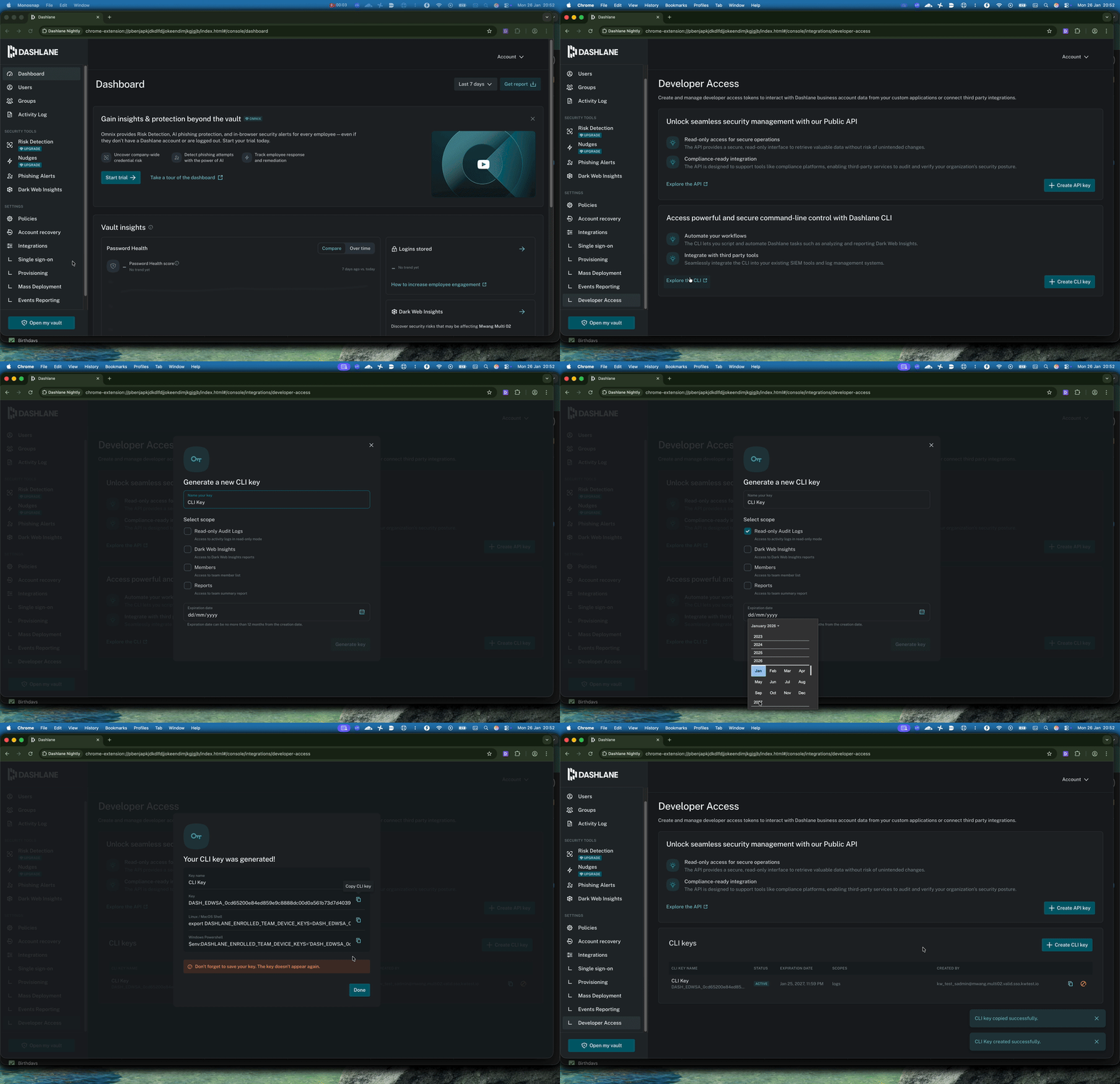
There’s one component that did experience a visible user experience upgrade: The Dashlane Command Line Interface (CLI). The CLI allows Dashlane admins to download raw activity logs on demand or set up an automated pipeline to pull new logs at regular intervals for internal apps or integrations with third-party security solutions (like SIEMs or EDRs).
To tighten the security of the CLI endpoints, we created a new CLI key that contains paired credentials needed to access both our server communication module and the Nitro secured enclave.
These CLI keys have also been enhanced with granular scopes (whether for logs, Dark Web Insights, members’ information, or reports), a maximum expiration date of 12 months, and more transparency into all admins’ key activity.
Finally, we replaced CLI key generation in the terminal with CLI key generation done exclusively in the Admin Console to make it easier to use and improve visibility for all admins.
Setting a new standard for activity log security
This infrastructure represents more than a technical achievement—it redefines what's possible in credential security platforms. By combining confidential computing with zero-knowledge encryption, we've proven that organizations don't have to choose between comprehensive visibility and absolute data privacy.
Our customers now benefit from activity logs that capture the full scope of credential risk across their workforce—vault usage, sharing activity, compromised credentials, weak passwords, and more—all while maintaining cryptographic guarantees that even Dashlane cannot access their sensitive data.
This approach to activity logs is foundational to Omnix's intelligence layer. As credential threats continue to evolve and security teams demand deeper insights, we're building on an infrastructure that never compromises on privacy.
Explore our intelligent credential security platform and discover how zero-knowledge architecture scales across your entire security stack.
Sign up to receive news and updates about Dashlane