Today, design sells trust online. A smooth, polished website now feels almost as important as the product or the technology behind it. But in modern phishing, that same polished design can also be the disguise: a stage set built to look real just long enough to win your trust.
This is even more dangerous now that scammers can vibe-code convincing webpages with large language models in just a couple of hours. Traditional protections like spam filters, firewalls, and blacklists are still useful, but they can’t see everything, especially when a user lands on a page that looks legitimate and hasn’t yet been flagged.
Security by design: inside Dashlane’s AI phishing detection
Technology like Dashlane’s real-time, AI-powered phishing detection, called AI phishing alerts, adds a critical layer of defense. AI phishing alerts use a proprietary AI model to analyze 75+ webpage attributes in under half a second, spot suspicious behavior behind the design, and warn the user before credentials, card details, or personal data are exposed.
Dashlane’s AI phishing detection technology is like a personal bodyguard helping keep you safe online. Moreover, it’s designed to protect you while maintaining your privacy. Like other Dashlane features, AI phishing alerts are built with a secure-by-design and privacy-first approach on zero-knowledge architecture.
Unlike blacklists, which only recognize already-reported threats, our AI detection model can recognize suspicious patterns on the fly, analyzing those attributes hidden inside a webpage and combining them into one informed warning. This helps catch risks that traditional defenses miss, including pages engineered to look polished only where it matters most for the attacker—the final credential form—while the rest of the page remains superficial or broken.
That said, even a strong model can occasionally flag a legitimate page because some legitimate pages with atypical and structurally inconsistent frontend implementations share patterns commonly seen in phishing pages. That isn’t a flaw. Rather, it’s the model doing its job: evaluating suspicious combinations of page characteristics in context to identify phishing.
Below, we unpack the strongest of those patterns and give you the inside scoop on the top five things to check on a webpage.
Top 5 strongest phishing signals detected by Dashlane, 2025-2026
Dashlane’s AI phishing detection and AI scam protection systems aren’t just another wrapper on top of a large language model. Under the hood, they rely on an interpretable internal AI model built around carefully selected webpage signals. These signals come from the real-world expertise of our security team.
Thus, when the model says, “This is likely a scam,” we can also ask, “What exactly gave it away?” This allows Dashlane to not only detect threats but also to learn from them and summarize today’s phishing landscape into the top 5 strongest phishing signals.
1. Sometimes less is better, and sometimes not
The first strong pattern is page completeness. But this isn’t just about minimalist design. When our model says, “Not enough content,” it looks at the visible content on the page and evaluates how much real information is actually there.
At this point, you may wonder: if modern phishing pages can look almost identical to real ones, how can content still help? The answer is that this level of realism is usually reserved for more targeted campaigns, which may invest significant effort in reproducing a company’s exact login or SSO flow because they only need to deceive a small number of users, but they need to do it convincingly.
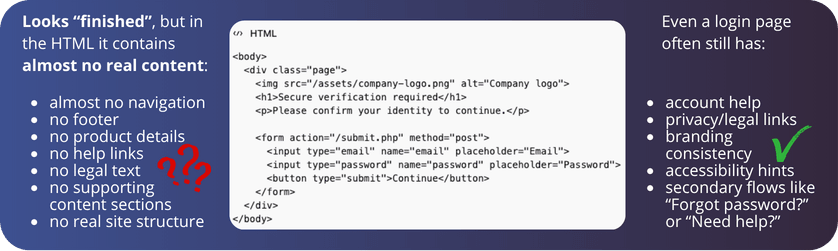
Most phishing pages, however, only need to look credible at a glance. Rich, coherent content is harder to produce, easier to contradict, and gives defenders more to analyze, so attackers often rely on shortcuts instead: a logo, a screenshot, a fake login box, a QR code, or a fake CAPTCHA.
As a result, the page can appear visually complete while containing very little real content. This is reinforced by the economics of phishing: many campaigns are built for speed and scale, not completeness, so launching large numbers of short-lived, low-effort pages can still be profitable even when obvious webpage elements are missing.
2. The devil wears no CSS
Continuing the minimalism theme: phishing pages often don’t need a full styling system. They only need to look convincing for a few seconds—just long enough for the victim to trust the page and enter their data. So instead of building a properly styled website, attackers often cut corners on CSS and rely on shortcuts that create the appearance of legitimacy without the full styling infrastructure of a real product.
That matters because CSS is what gives a page its consistent visual logic: shared button styles, reusable form design, spacing rules, navigation behavior, responsive layouts, and so on. A legitimate website usually needs all of that.
A scammer, on the other hand, will often strip things down to the minimum: fewer layouts, no responsive variants, no reusable design system, or even direct styling inside the page code itself. A button color may be defined right on the button, and spacing may be hardcoded element by element:
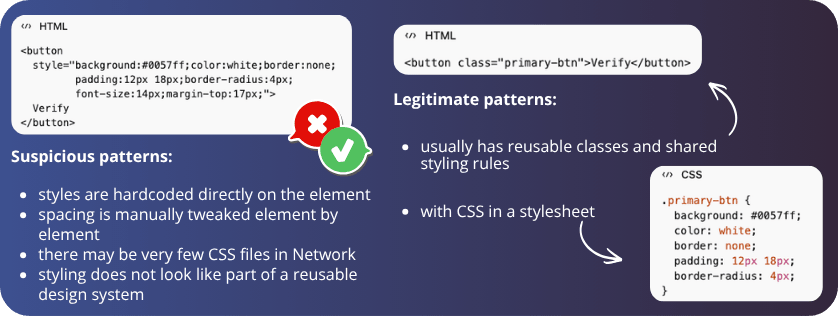
The result is often fewer CSS files, a less maintainable system, and, overall, a structure that already looks like bad practice for a legitimate website.
At the same time, CSS can also be used by the scammers to control visibility, meaning that some elements may exist in the code while remaining hidden from the user (e.g., some hidden forms). This is why our AI-based system takes into account so many signals: to keep the context of not only the number of CSS files used but also the ways it is used.
3. Props should be used in theater, not on web pages
While some things can be spotted directly from a website’s UI, others require looking under the hood. But let’s be honest: not everyone even knows how to open the developer tools. Even if you know where to look, it’s still hard to inspect all the page components and judge whether they’re genuinely functional or just convincing fakes, especially on pages that mimic more complex websites, such as online stores.
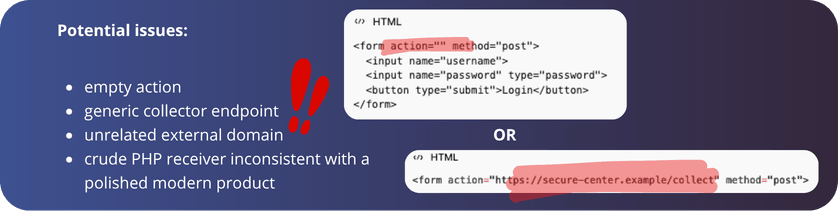
Our model can detect props-like patterns such as missing placeholder navigation, empty actions, and superficial page structure, the kinds of signals most users would never check manually. At the same time, we know that even legitimate websites are not perfect. That’s why we don’t treat one flaw as proof of malicious intent
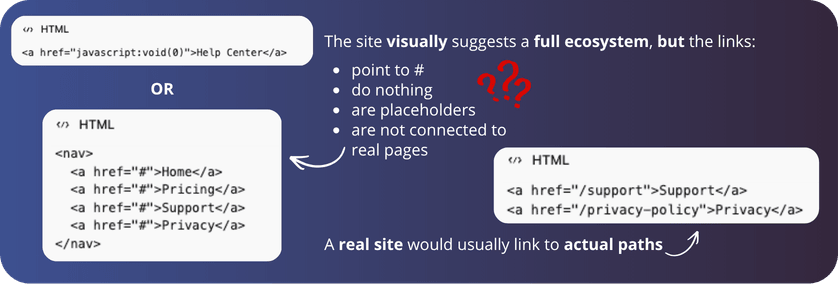
Instead, Dashlane’s AI is trained on diverse data so it can generalize, weigh many signals together, and make a more informed decision than any single indicator could on its own.
4. Built together, not stitched together
Web development standards can be blurry, but a legitimate website should still follow reasonable conventions. A trustworthy page should have a consistent resource footprint—content, branding, assets, and navigation should feel like parts of one system, not like they came from different universes.
So when we talk about too many external resources, we don’t mean that third-party tools are bad. Analytics, payment widgets, CAPTCHA, maps, and fonts are all normal. The real issue is that perfectly legitimate pages often accumulate inconsistency over time: one team adds a newsletter form from an external provider, another introduces a new UI framework, older legacy code remains in place, and regional versions evolve separately:
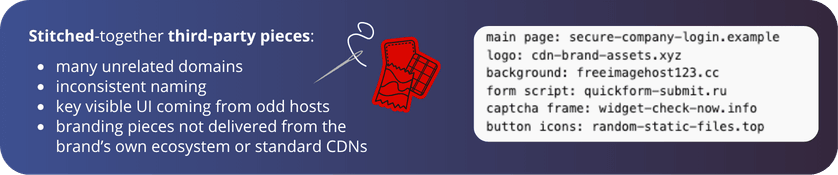
The result is a page where different pieces no longer fully agree with each other. Externally embedded iframe or image blocks may look slightly off-brand, with different padding, fonts, proportions, or loading behavior than the surrounding page. Nothing malicious—just a page that has grown in layers, and now looks more stitched together than it should.
This also matters for phishing detection because scam pages often show the same pattern in a more exaggerated form. Rather than being built as one coherent product, they’re frequently assembled quickly from reused templates, copied brand elements, and external components chosen for speed, not consistency. Pages that may look convincing at first glance have content, branding, assets, and interactions that don’t fully belong together.
This is exactly the kind of pattern AI can help detect, not by treating every external resource as suspicious, but by recognizing when a page’s overall resource footprint looks more like an imitation than a mature website.
5. The URL red flag that actually matters
You may have heard that URLs shouldn’t look too random or contain too many numbers. But in reality, not every weird-looking part of a URL matters equally.
As a reminder, a URL usually includes the protocol (https://), the hostname or domain (login.microsoftonline.com), the path (/common/oauth2/authorize/), and parameters (?info=verify-user-session&lang=en). These provide extra instructions such as language, session, or login details.
When it comes to suspicious URLs, the first thing to inspect is the hostname. Let’s take the following two examples: which one looks suspicious?

At first glance, the first URL may seem like the obvious culprit. It’s long, messy, full of numbers, question marks, and percentages—surely that must be a scam. But in practice, it’s the other way around. Everything after the separator of the hostname just tells the site which page the user wants to visit and what to do next.
In the meantime, pages tend to look more suspicious when the hostname itself feels random, unstable, or inconsistent, like in the second URL, where the hostname is long and has strange numbers in it. That doesn’t mean every unusual address is malicious. Naturally, our model anticipates variety and weighs multiple signals at once. But it does mean that domain clarity matters far more than many site owners realize.
What does this mean for Dashlane customers and web developers?
If you use a Dashlane personal plan, anti-scam protection is already activated by default. For organizations, Dashlane admins must activate our phishing protection features from the admin console.
For web developers, the goal should be to keep things simple and make your website look normal, coherent, and trustworthy:
- Use clear and stable domains
- Avoid ultra-thin pages built around a single form
- Keep navigation and interactions real
- Make forms transparent about who is asking for data and why
Just as importantly, don’t rely on polished visuals alone. Today, when AI makes it easier than ever to generate webpages quickly, details matter even more. Generative AI can help teams move faster, but it can also lose context, create inconsistencies, and miss the bigger picture.
Dashlane strongly believes in a human-in-the-loop approach because good web quality is also good security. A page with clear structure, coherent branding, meaningful navigation, transparent forms, and a trustworthy domain is easier for users to trust and much harder for attackers to imitate.
Your critical layer of protection
The signals highlighted here are only a subset of the strongest patterns driving phishing detection. In practice, Dashlane’s anti-phishing system evaluates a much broader set of signals together because phishing isn’t defined by one red flag but by combinations that become suspicious in context.
That broader view matters because phishing is evolving fast. AI is accelerating both social engineering and page design. The message that delivers the link can be more persuasive, and the landing page itself can look far more polished than before. This makes phishing increasingly difficult to stop at the distribution stage alone.
That’s where Dashlane adds a critical layer. It analyzes the page itself, alongside the user, and looks for the signals that are often invisible at first glance but hard for attackers to fake consistently. We’re not here to replace email filtering, browser safeguards, or network defenses. We complement them exactly where this matters most: on the page itself.
As legitimate web practices and phishing tactics evolve, your protection should too. That’s why we continuously update our datasets, monitor emerging trends, and study real attacks to keep adapting. Stay ahead of tomorrow’s threats and see how Dashlane helps keep you safer online.
Sign up to receive news and updates about Dashlane