Co-written by Yann Gensous and Quentin Barbe
AI coding tools are transforming engineering. Securing them is non-negotiable
Every engineering team is adopting AI coding tools right now. Dashlane is no different, and we rolled out Claude Code and MCPs across the entire engineering organization earlier this year. We wanted to move fast. But as a security-focused company, we needed to set up strong guardrails to protect our clients, employees, and infrastructure.
Our threat model: What we designed against
Before starting any rollout, we built a threat model to map out what could actually go wrong. We identified four main risks that guided our decisions:
- Secret and credential leakage: AI tools can send code context to external providers. If your repository or environment contains API keys, tokens, or credentials, those secrets can end up outside your perimeter.
- Data leaking through MCP connections: MCP servers connect AI agents to external systems, such as documentation and code repositories. Each connection is a way for data to leak out.
- AI agents with too many permissions: When an agent queries an internal tool, it uses whatever access that connection grants. If the permissions are broad, the agent's reach is broad too.
- Misconfigured access: A misconfigured development environment can give an AI tool direct access to sensitive systems.
Recent incidents across the industry confirmed that each of these risks is actively exploited. Incidents have included exposure of API keys in training data, data exfiltration, prompt injection attacks, and agents deleting production environments.
Why we chose Dev Containers as the isolation layer
We needed a setup that isolated the AI tools while still letting engineers get real work done. Dev Containers gave us that boundary. They are sandboxed environments that run inside a container on the developer's machine. They let you define exactly what AI tools can access: which network endpoints, which files, which libraries.
- VSCode supports Dev Containers natively. We didn't want to force a new editor on anyone, so Dev Containers meant lower friction. Our engineers could adopt the setup without changing their editor or daily workflow.
- Claude Code runs well inside Dev Containers. We set a strict configuration on network access, filesystem, available libraries, and how we handle secrets and credentials inside the container boundary.
- The tradeoff was acceptable. Dev Containers add complexity to the initial setup and the dev environment, but the security they provide is strong enough to justify it. In practice, the friction was manageable: within three months, 80% of engineers had adopted the setup.
How it works: Claude Code + MCP inside Dev Containers
By design, MCP servers assume direct network access between the AI client and the server, and Dev Containers restrict that. So we built a workaround using socat to forward MCP traffic between the container and the host, keeping the network boundary intact. This also allows us to isolate the OAuth credentials from the agent.
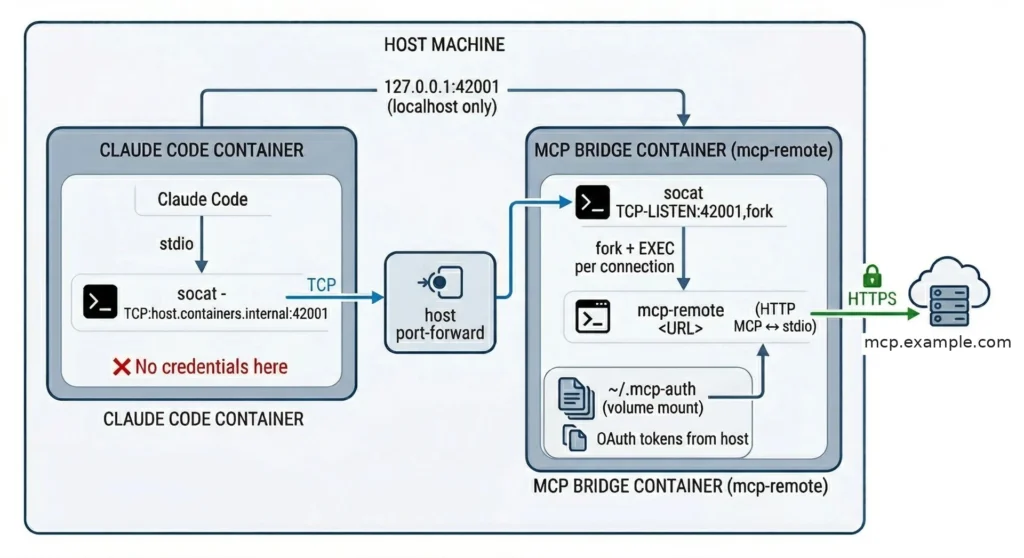
If you're aiming for something similar, plan time for this specifically. MCP tooling is moving quickly, but container support still requires manual effort. Don't assume it will work out of the box.
Securing the full chain: Why we audit every access path
MCP makes content across your internal tools much easier to discover. That's the goal, but it's also the risk. AI agents can reach things much faster and on a wider scale than humans. Before rollout, we audited the permission model on every connected system, as existing permissions may be too broad.
We applied the principle of least privilege to every MCP connection. We locked down sensitive environments entirely and documented the permission model for each tool, so teams understood what the AI could and couldn't access.
Adoption and developer experience
Once we had a secure environment, we started an initiative for all engineers to adopt the tools.
We launched an internal AI guild, a cross-team group responsible for training, support, and building shared knowledge around AI tools. The guild ran installation workshops, collected feedback, and iterated on the Dev Container configuration.
Then we set up a simple approach based on education and iteration.
- Start with an acceptable security level. For us, that was Dev Containers. Not perfect, but a strong foundation we could build on.
- Train teams on real risks. We ran sessions on resource control, indirect prompt injection from external systems, and the specific ways MCP connections can be abused. Engineers who understand the guardrails will be better equipped to understand new risky situations.
- Build proper threat model and review system for new tools. In this fast-moving ecosystem, teams are going to request new models, MCPs… Make sure the rules are clear on what’s acceptable, and have a process to integrate in your AI infrastructure. For example in our case, we created an internal marketplace for Claude Code, and progressively documented the tools that had been approved by our security team.
Conclusion: A checklist for teams considering the same rollout
If you are considering building your own secure AI dev environment, this is what we recommend:
- From the start, isolate AI tools in Dev Containers to prevent giving them full machine access.
- Audit permissions on every connected system, keeping in mind that what's fine for humans might be too broad for agents.
- Document the MCP permission model.
- Start with a "good enough" security baseline and iterate.
None of this is final. The tools are changing fast, and so is our setup. We'll keep sharing what we find.
Sign up to receive news and updates about Dashlane