[Apr 2026] What’s New at Dashlane: KnowBe4 Integration, More Detailed Risk Detection Logs, and More


In this monthly roundup of our latest product updates for organizations and individuals, check out how we delivered more value to you in April 2026.
For organizations
Closing the credential risk loop with KnowBe4
Dashlane now integrates directly with KnowBe4, bringing together industry-leading credential risk detection and security awareness training in one connected workflow.
When Dashlane detects employees’ risky credential behavior, that signal can now flow into KnowBe4 to automatically trigger targeted, in-the-moment training, turning reactive alerts into proactive risk reduction.
Credential misuse is the primary driver of modern breaches. This first-of-its-kind integration gives security teams a direct line between detecting the problem and addressing the human behavior behind it while also providing them with the visibility needed for timely remediation.
Richer Risk Detection logs show Account Type and more
We've upgraded Dashlane Omnix® Risk Detection logs with four new high-precision columns: User Identity, Device Name, Associated Dashlane Vault User, and Account Type (professional versus personal).
Previously, activity logs combined device and vault logins into a single user column. Now, those signals are clearly separated when you export data, making it even easier to determine who is behind a risky event and whether that event involved a work credential or a personal one.
The User Identity column captures the exact email address, username, or device username used at the at-risk site. Account Type lets admins instantly filter for professional risk events (once at least one domain is verified). And for teams in shared-device environments—like hospitals or schools—it's now possible to pin a risk to a specific person, not just a machine.
These improvements are most impactful in your exported logs, giving admins the precision to investigate confidently and act decisively, whether working manually, through alerts, or using a SIEM.
Weak and compromised SSO logins flagged in the Admin Console
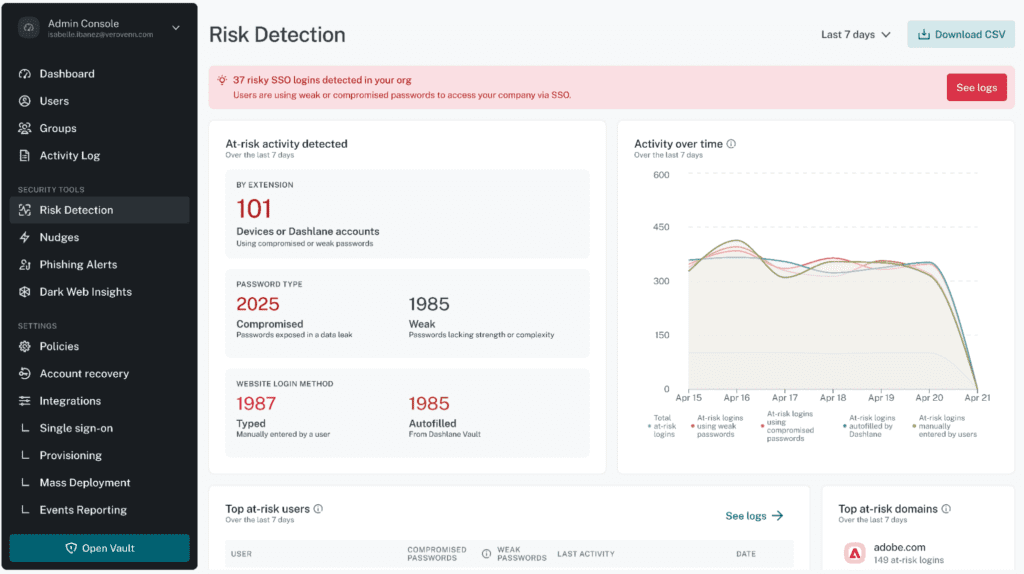
SSO accounts are high-value targets. That’s why a new high-severity alert flags weak and compromised SSO logins directly in the Admin Console.
Admins with Risk Detection enabled get filtered logs, enabling them to see exactly how many weak and compromised SSO logins are present across their organization.
Browser activity coverage, now visible in the Users Page
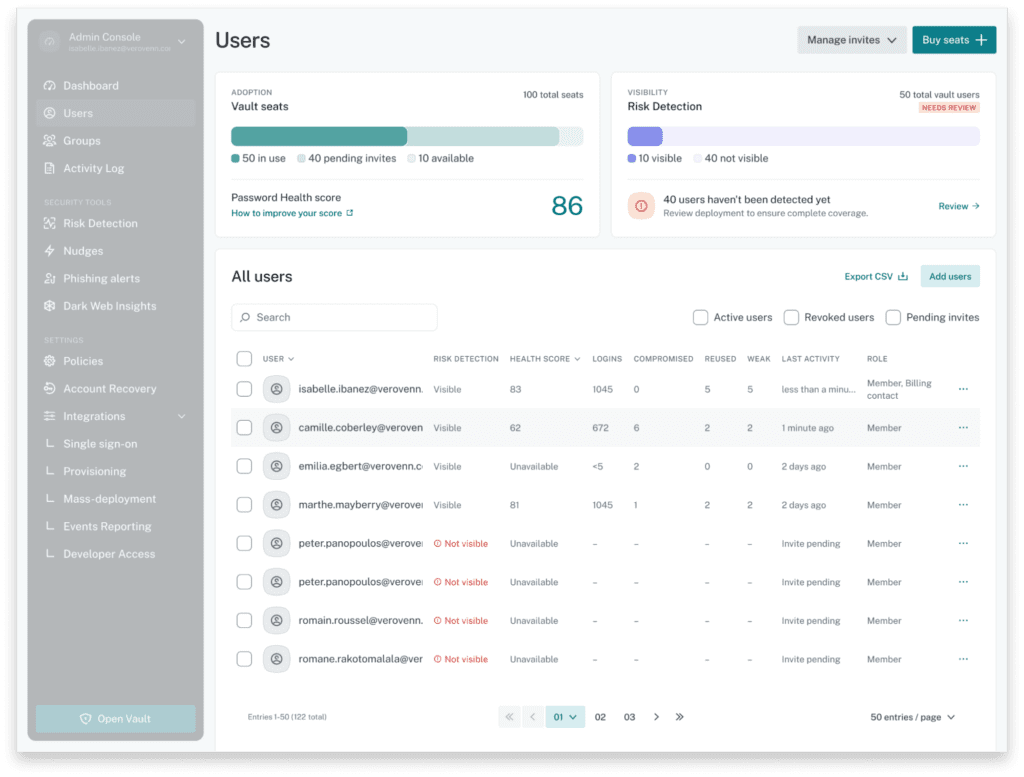
The Omnix Users Page now shows your Risk Detection coverage alongside vault status for every employee. For each user, you'll see a clear Browser Activity signal—Visible or No Visibility—so you know at a glance who Omnix is protecting in the browser and who it isn't.
The Admin Console even provides guidance on how to close gaps in coverage that it identifies.
Restrict employees to work email addresses only
Admins can now enable a "Block non-work logins" setting from the Admin Console. Once turned on, employees using a mass-deployed extension will be restricted to logging in, registering a device, or creating a Dashlane account with their work email only. Personal addresses like @gmail.com will be blocked, with a clear message directing employees to use their work email instead.
This applies to mass-deployed extensions with verified domains, and it helps ensure that professional credentials stay in the right place, making offboarding and access revocation cleaner and more reliable.
For organizations and individuals
Near-instant autofill on Android
We've rebuilt the Android autofill engine from the ground up. A new, pre-indexed local suggestions database replaces the legacy system, delivering near-instant credential suggestions when you tap a login field, even with vaults of 1,000+ credentials.
This upgrade makes the autofill our Android users leverage every day even faster and easier to use.
Sign up to receive news and updates about Dashlane