
Hacking-related breaches usually involve stolen or weak credentials. Multi-factor authentication (MFA) is a pretty effective control IT teams can deploy to close that gap, but not all MFA is created equal.
SMS codes, authenticator apps, hardware security keys, and passkeys each sit at a different point on the spectrum of security, usability, and deployment complexity. For enterprise IT teams choosing an MFA strategy, the differences matter significantly.
This guide breaks down every major MFA method, compares their security tradeoffs side by side, and gives enterprise IT admins a clear framework for deciding which methods to deploy and where.
Quick note on terminology: MFA requires two or more of: something you know (password), something you have (a device or key), and something you are (biometrics). All the methods below serve as the “something you have” factor.
What is MFA authentication and why does it matter?
MFA authentication adds a second verification step after the password. Even if an attacker obtains a user's credentials through phishing, credential stuffing, or a data breach, they still can’t access the account without the second factor.
For enterprise environments, the stakes are higher than for individual consumers:
- Compliance requirements: HIPAA, SOC 2, ISO 27001, and NIST 800-63B all recommend or require MFA for privileged access.
- Blast radius: A single compromised employee account can expose customer data, source code, financial systems, or internal infrastructure.
- Credential reuse: Employees regularly reuse passwords across personal and work accounts, making enterprise systems vulnerable to consumer data breaches.
But the type of MFA you choose matters. CISA's own guidance distinguishes between phishing-resistant MFA and legacy MFA and strongly recommends that enterprises move toward phishing-resistant methods. Here's why that distinction is critical.
The 4 major MFA methods explained
1. SMS one-time codes
SMS MFA sends a code six to eight digits long to the user's registered phone number. The user enters the code within a short time window to complete the login.
How it works: The authentication server generates a time-sensitive code and sends it through the carrier's SMS network. The user enters the code in the login flow.
Pros
- Familiar to users, very low friction and training burden
- No additional app or hardware required
- Widely supported across SaaS platforms and legacy systems
Cons
- Vulnerable to SIM-swapping attacks, where attackers transfer the victim's number to a new SIM
- Subject to SS7 protocol vulnerabilities that allow interception of SMS messages
- Phishable; real-time phishing attacks can relay the OTP before it expires
- Requires a working cellular signal; fails in low-connectivity environments
NIST 800-63B officially deprecated SMS as a second factor for high-assurance use cases in 2017. While still widely used, it’s not recommended for enterprise environments that handle sensitive data.
2. Authenticator apps (TOTP)
Authenticator apps like Google Authenticator, Microsoft Authenticator, and Duo generate time-based one-time passwords (TOTP) that refresh every 30 seconds. The code is generated on-device, not transmitted over a network.
How it works: During setup, the app scans a QR code containing a shared secret. It then uses the TOTP algorithm (RFC 6238) to generate codes locally, requiring no network connectivity.
Pros
- No SMS network dependency; works offline
- Codes never transmitted, reducing interception risk
- Low cost, no hardware required beyond the user's existing smartphone
- Widely supported; industry-standard TOTP works across thousands of services
Cons
- Still phishable; attackers can create convincing fake login pages that capture and relay TOTP codes in real time
- Device loss or damage means locked-out users require admin recovery
- Recovery can itself become a security weakness if not managed carefully
Authenticator apps are the current enterprise standard and a significant improvement over SMS. However, they don’t provide phishing resistance. A determined attacker with a real-time phishing proxy can still compromise TOTP-protected accounts.
3. Hardware security keys (FIDO2 / WebAuthn)
Hardware security keys, such as YubiKeys, Google Titan keys, or Feitian devices, are physical USB, NFC, or Bluetooth devices that provide cryptographic authentication. They implement the FIDO2 / WebAuthn standard.
How it works: The key is based on public-key cryptography. During registration, the device generates a unique key pair per site. At login, the site sends a challenge; the key signs it with the private key (which never leaves the device). The signature is verified server-side.
Pros
- Phishing resistant; the cryptographic binding to the domain means a fake login page can’t extract a valid credential, and the key refuses to authenticate to an unrecognized domain
- Immune to SIM-swapping, SS7 attacks, and real-time phishing proxies
- CISA, NSA, and NIST all recommend FIDO2 hardware keys for high-assurance use cases
- Dashlane supports YubiKey and FIDO2 hardware keys; see YubiKey compatibility for setup details
Cons
- Hardware cost ($25 to $60 per key; typically issued in pairs per employee)
- Physical loss or damage requires an IT-managed recovery procedure
- Deployment and enrollment at scale require planning, particularly for remote employees
- Not all legacy apps support FIDO2/WebAuthn yet
Hardware keys are the gold standard for phishing resistance and the recommended method for privileged accounts, admin users, and anyone with access to sensitive systems. CISA explicitly recommends hardware security keys for organizations facing elevated threat levels.
4. Passkeys (FIDO2 device-bound and synced)
Passkeys are the newest entrant and represent a fundamental shift from passwords and MFA to a single, phishing-resistant cryptographic credential. They use the same FIDO2/WebAuthn standard as hardware keys, but the key pair lives on the user's device (or in a synced keychain) rather than separate hardware.
How it works: A passkey is a cryptographic key pair generated per site. The private key is stored in the device's secure enclave (or synced using Dashlane or another password manager). Login involves biometric or PIN verification on-device, which releases the private key to sign the server's challenge.
Pros
- Phishing resistant, with the same cryptographic binding as hardware keys
- No separate hardware required; uses existing devices
- Eliminates the password when used as a primary credential
- Synced passkeys enable cross-device recovery without IT involvement
- Dashlane's passkey support allows employees to store, sync, and use passkeys across all devices without relying on the OS keychain
Cons
- Adoption is still maturing; not all enterprise SaaS platforms support passkeys yet
- Device-bound passkeys (no sync) face the same recovery challenges as hardware keys
- Requires employee education to distinguish passkeys from passwords
Passkeys represent where enterprise authentication is heading. The FIDO Alliance reports that all major platforms—Apple, Google, and Microsoft—now support passkeys natively. For organizations starting a fresh MFA rollout, including passkey support in your strategy is strongly recommended.
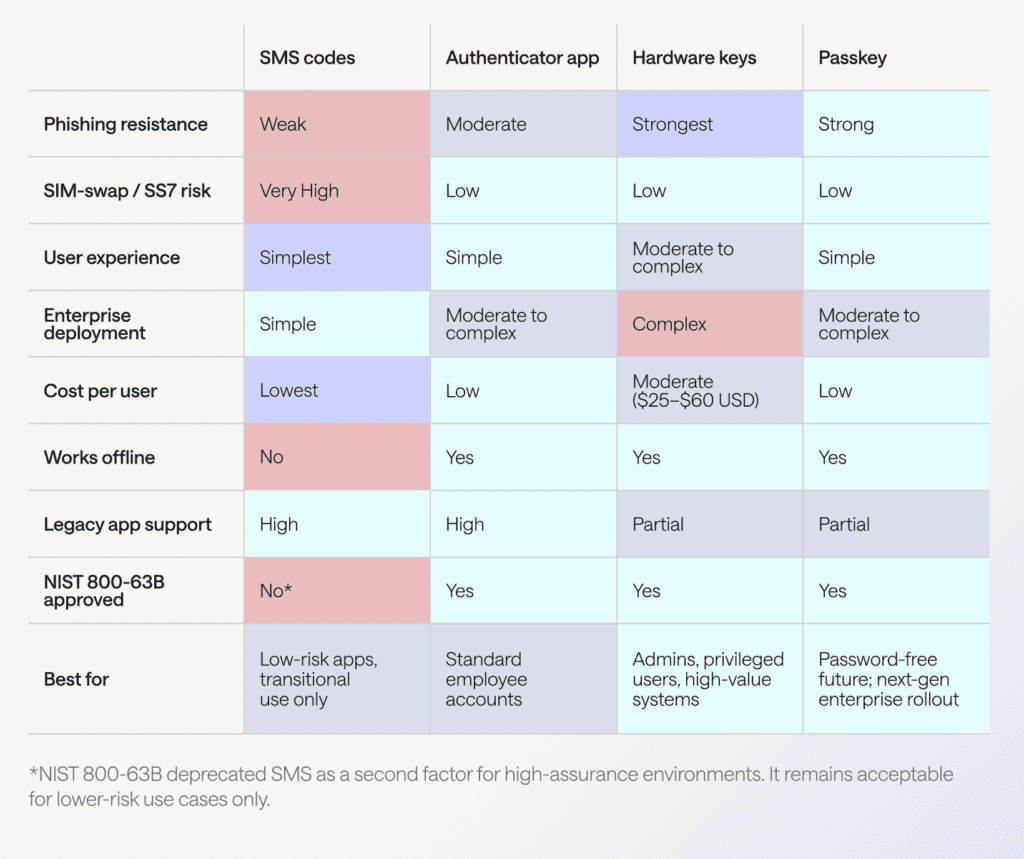
MFA methods comparison table
The table below summarizes the key security, usability, and cost dimensions across all four methods.
Enterprise MFA deployment: Which methods to use and where
For most enterprises, a tiered MFA strategy delivers the best balance of security and usability. Deploy the strongest method to the highest-risk users, while maintaining practical options for the broader workforce.
Tier 1: Privileged and admin accounts
Recommended: Hardware security keys (FIDO2) and passkeys as a backup
Privileged accounts, IT admins, finance team members, C-suite, DevOps engineers, and anyone with access to production systems represent the highest-value targets for attackers. Hardware keys provide the strongest available protection: Cryptographic phishing resistance with no reliance on software or network transmission.
For organizations using Dashlane, Dashlane's enterprise password manager integrates with hardware key MFA to secure the vault access layer, ensuring even the password manager itself can’t be accessed using a phished credential.
Tier 2: Standard employee accounts
Recommended: Authenticator apps (TOTP) with a passkey migration path
For the general employee population, authenticator apps provide a strong improvement over passwords alone at minimal cost. Microsoft's research shows that 99.99% of MFA-enabled accounts remained secure during an investigative period.
As passkey support expands across your SaaS stack, plan a phased migration to passkeys for a smoother employee experience, particularly for onboarding and remote workers.
Tier 3: Legacy systems and low-risk apps
Acceptable: SMS OTP as a transitional measure only
If legacy systems only support SMS-based OTP and upgrading them is not immediately feasible, SMS remains acceptable as a short-term measure for low-risk apps. However, this should be documented as a known gap in your security posture with a defined remediation timeline, particularly under SOC 2 or ISO 27001 audits.
Implementation checklist for IT teams
Phase 1: Audit and inventory (weeks 1–2)
- Identify all apps in use and their supported MFA methods
- Segment users by privilege level and data access
- Assess current MFA enrollment rates by app
Phase 2: Privileged account hardening (weeks 3–4)
- Procure hardware keys (minimum 2 per privileged user, primary and backup)
- Enroll all admin and privileged accounts; enforce at the identity provider (IdP) level
- Set up hardware key recovery procedure through the Dashlane admin console
Phase 3: Broad employee rollout (weeks 5–10)
- Deploy authenticator app MFA to all staff using MDM or IdP
- Provide self-enrollment instructions and an IT help desk escalation path
- Set a 30-day deadline with enforcement using conditional access policies
Phase 4: Passkey enablement (ongoing)
- Enable passkey support in Dashlane for employees to begin adopting passkeys on supported services
- Track which SaaS platforms have added passkey support; prioritize high-risk services
- Plan deprecation of SMS MFA for all internal systems
Which MFA method should enterprises choose?
The honest answer is: All of the above, deployed in layers.
No enterprise should be running a single MFA method across its entire user base and tech stack. The threat landscape, particularly the rise of adversary-in-the-middle (AiTM) phishing toolkits that can bypass TOTP in real time, means that authenticator apps alone are insufficient for your highest-risk accounts.
Here is the practical recommendation:
- Eliminate SMS MFA for any system containing sensitive business data. Document exceptions with a migration timeline for audit purposes.
- Standardize on authenticator apps for the general employee population today. Duo, Microsoft Authenticator, and Google Authenticator all support enterprise MDM enrollment.
- Deploy hardware keys immediately for IT admins, finance, legal, and any role with privileged system access. Dashlane's YubiKey integration makes hardware key MFA manageable at scale.
- Build passkeys into your roadmap. The credential protection layer—a password manager that stores, autofills, and secures passkeys alongside traditional credentials—is where tools like Dashlane's credential protection and SSO integration provide real enterprise value.
MFA enforcement alone prevents the majority of account compromise attacks. But combining phishing-resistant MFA with a robust enterprise password manager closes the gap that MFA alone leaves open: Weak, reused, and compromised passwords that attackers target before ever attempting to bypass MFA.
Frequently asked questions
What is the difference between MFA authentication and 2FA?
Two-factor authentication (2FA) is a subset of MFA, which uses exactly two factors. MFA is the broader term and can include three or more factors. In practice, most enterprise deployments use two factors (password and one additional method), so the terms are often used interchangeably.
What are the most common MFA methods in enterprise environments?
Authenticator apps (TOTP) are currently the most widely deployed enterprise MFA method, followed by hardware security keys for privileged users and SMS OTP as a legacy fallback. Passkey adoption is growing rapidly as major identity providers add support.
How do I enable MFA across my organization?
The fastest path is through your identity provider (Okta, Microsoft Entra ID, Google Workspace), plus a credential management platform.
Are passkeys the same as hardware keys?
No, both use the FIDO2 standard, but hardware keys are physical USB/NFC devices with the private key stored on the hardware itself. Passkeys are software-based key pairs stored on a device's secure enclave or in a synced keychain. Both are phishing-resistant; hardware keys offer slightly stronger guarantees because the private key can’t be extracted from the device.
Is SMS still acceptable as an MFA method?
NIST 800-63B deprecated SMS as a second factor for high-assurance use cases. For low-risk apps and as a temporary transitional measure, SMS is still widely used. However, it shouldn’t be relied upon for systems handling sensitive data, admin access, or regulated information. CISA explicitly recommends migrating away from SMS-based MFA.
Sign up to receive news and updates about Dashlane