
A business password manager evaluation is a structured review of tools that store, share, and protect employee credentials. IT and security teams use it to find a solution that lowers credential risk without slowing employees down.
Evaluate business password managers on these seven criteria:
- Security architecture
- Identity integration
- Admin controls
- Risk visibility
- Auditing and integrations
- Employee experience
- Total cost
Each section lists the questions to ask vendors and shows how Dashlane answers them, so you can compare vendors on the same terms.
What is a business password manager?
A business password manager centralizes how an organization stores, shares, and secures credentials. Employees get a vault and autofill. IT gets an Admin Console with policies, provisioning, and reporting.
When employees pick their own personal tools, IT can’t enforce policies, see risk, or remove access when someone leaves.
Why does a business password manager evaluation matter?
Attackers still rely on stolen and misused credentials. The Verizon 2026 Data Breach Investigations Report found credential abuse in 39% of breaches when counted at any stage of the attack.
SSO protects the apps connected to your IdP, but employees still create logins for apps outside it. A business password manager gives you control over those credentials. Dashlane also monitors for credential risk in the browser, including for employees who don’t use a vault.
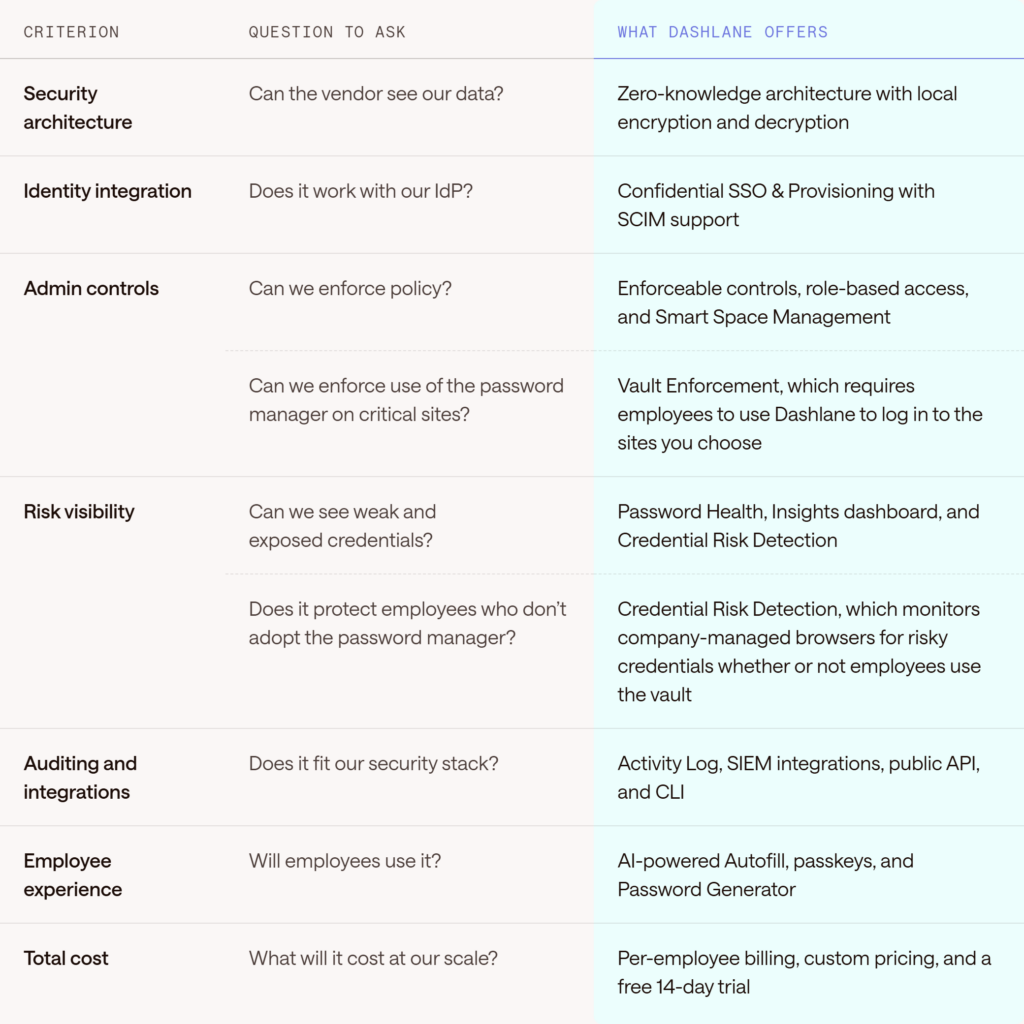
Business password manager evaluation criteria at a glance
Use this table to compare vendors side by side. The Help Center plan comparison lists full plan details.
Criterion 1: Security architecture
Start with how the vendor protects your data. Ask whether the vendor can access your vault, how it manages keys, and which certifications it holds.
Dashlane uses a zero-knowledge architecture that encrypts and decrypts vaults locally on each user’s device and can’t see user credentials. In addition, Dashlane encrypts vaults with AES256-CBC-HMAC, derives keys with Argon2d, and uses confidential computing to protect data in the cloud.
Criterion 2: Identity and provisioning
Your password manager should fit your identity stack. Ask about SSO, SCIM, and which IdPs the vendor supports.
Dashlane connects to your IdP through Confidential SSO & Provisioning. SCIM works with Microsoft Entra ID, Okta, JumpCloud, PingID, and other IdPs, so onboarding and offboarding follow your IdP. SSO and SCIM require a Password Management or Credential Protection plan.
Criterion 3: Admin controls and policies
Admin controls set how much of your security policy IT can enforce. Ask what IT can require, restrict, and delegate:
- Enforced security standards. Through Controls, admins can require 2-factor authentication (2FA) and set automatic logout after inactivity.
- Role-based access. Roles include members, admins, and group managers, with permission sets for managing sharing groups.
- Sharing rules. By default, members can’t share outside the company or export data.
Criterion 4: Risk visibility
Ask whether the tool shows weak, reused, and compromised credentials, and whether it covers employees who don't use the vault.
Dashlane admins get a Password Health score with per-employee detail and an Insights dashboard to track trends. Credential Risk Detection monitors company-managed browsers for risky credentials, and AI Phishing Alerts warn employees about suspicious sites.
Criterion 5: Auditing and integrations
Your security team needs audit records and connections to the tools it already runs. Ask about logs, SIEM support, and APIs.
The Activity Log records member, admin, 2FA, SSO, SCIM, and risk events from the past 15 months. Dashlane integrates with SIEM tools, including Crowdstrike, Splunk, and Microsoft Sentinel, and the public API and CLI support custom workflows. Admins can deploy the browser extension through Jamf, GPO, or Intune.
Criterion 6: Employee experience
Employees who skip the password manager leave their credentials unprotected. Include end users in your pilot and track adoption alongside features
Dashlane offers AI-powered Autofill, a Password Generator, secure sharing, and passkey storage. Ask pilot users how fast they can log in and share a credential.
Criterion 7: Total cost and plan fit
List price covers only part of the cost. Add admin time, deployment effort, and any features you’d need to buy separately. Include admin time, deployment effort, and the features you'd need to buy separately.
Dashlane bills by the number of employees and can provide custom pricing. Each plan covers a different need:
- Omnix Password Management: Secure vault, AI-powered Autofill, secure sharing, admin vault policies, SSO, and SCIM.
- Omnix Credential Protection: Credential Risk Detection, AI Phishing Alerts, custom rules, and Credential Risk Alerts.
- Omnix Enterprise: Both sets of features in one package, with a choice of seats for Password Management and employees covered by Credential Protection.
How to run a business password manager evaluation
Follow the same steps for each vendor so you can compare results:
- Define requirements: List must-have and nice-to-have needs with input from IT, security, and compliance.
- Shortlist vendors: Use your criteria to narrow the field to a few options.
- Run a pilot: Test with a mix of admins and employees.
- Score each vendor: Use the scorecard in the next section and record notes.
- Validate security documents: Review certifications, architecture documentation, and breach response plans.
- Check integrations: Confirm IdP, SIEM, and deployment tools work in your environment.
- Decide and plan rollout: Pick a deployment approach and an adoption plan before you sign.
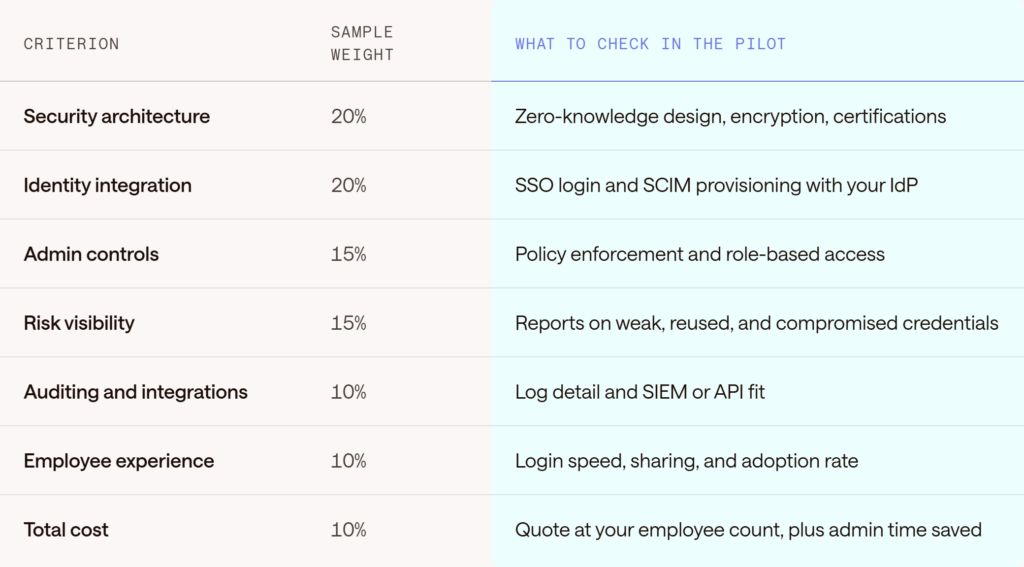
A sample evaluation scorecard
Start with these sample weights and adjust them to your priorities.
Evaluate Dashlane for your organization
Run your pilot on real workflows with the admins and employees who’ll use the tool. Dashlane brings zero-knowledge security, identity integration, admin controls, and risk visibility together in one platform.
FAQs about business password manager evaluation
What is a business password manager?
A business password manager is a centralized tool that stores, shares, and protects employee credentials, with admin controls for policies, provisioning, and reporting. It differs from a personal password manager because IT can manage access across the organization.
What features should a business password manager have?
Look for zero-knowledge encryption, SSO and SCIM integration, enforceable policies, role-based access, audit logs, credential risk visibility, and secure sharing. Employee-friendly autofill matters too, because adoption drives results.
How do I evaluate a business password manager?
Define your requirements, shortlist vendors, and run a pilot with real users. Then score each vendor against weighted criteria, validate security documentation, and confirm integration with your Identity Provider (IdP) and security tools.
Do I need a business password manager if I already have SSO?
Usually yes. SSO covers the apps connected to your IdP, but 37% of corporate apps sit outside SSO. A business password manager secures and monitors those credentials.
How much does a business password manager cost?
Dashlane bills by the number of employees in your organization and offers custom pricing. Compare total cost, including the plan features you need and the admin time you save.
What is the difference between Dashlane Password Management and Credential Protection?
Password Management includes the vault, autofill, secure sharing, and admin vault policies. Credential Protection adds Credential Risk Detection, AI Phishing Alerts, and Credential Risk Alerts. Omnix Enterprise combines both in one package.
Sign up to receive news and updates about Dashlane