
With data breaches making headlines every quarter, your choice of password manager is one of the most consequential security decisions your business can make.
But not all password managers are built the same. When you’re protecting employee credentials, customer data, and sensitive systems, “good enough” isn’t good enough.
This guide covers the five best password managers for security-focused businesses, what to look for when evaluating your options, and how to choose the right fit for your team.
The real cost of a data breach
Credential theft is the leading cause of data breaches globally. Weak or reused passwords give attackers a reliable entry point, and the consequences include regulatory penalties, permanent reputational damage, and financial loss.
In fact, the average cost of a data breach is $4.44 million.
A password manager that delivers proactive credential security is far less expensive than breach remediation. Phishing detection, credential risk alerts, dark web monitoring, and organization-wide risk visibility for admins turn a password manager from a convenience tool into a critical line of defense.
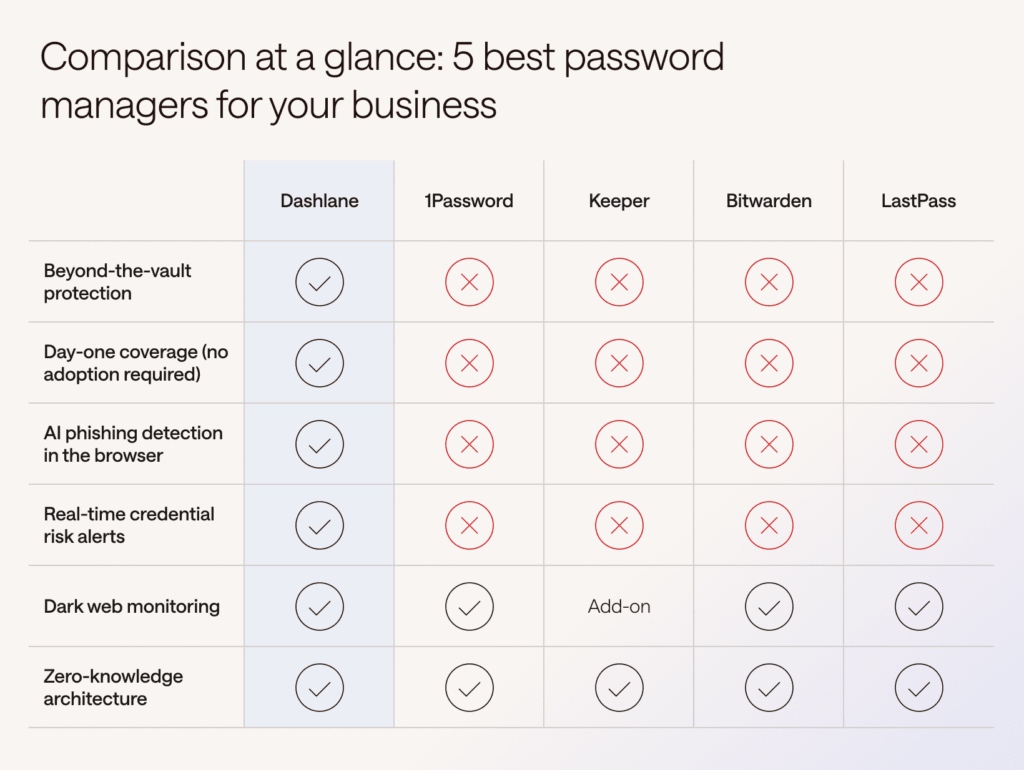
5 best password managers for security
Here’s a closer look at each solution, including pros, cons, and real user feedback.
1. Dashlane
Traditional password managers only protect what employees choose to store in the vault, but there's a 53% chance that when a risky password is used, the employee isn't even logged in to a password manager. That's a massive blind spot for security teams already stretched thin across a sprawling identity surface.
Dashlane Omnix® is a proactive credential security platform that takes a fundamentally different approach. Rather than waiting for employee adoption to deliver value, Omnix provides immediate detection, real-time alerting, and credential risk visibility the moment it's deployed. This protects every login, whether or not credentials live in the vault.
The result is coverage across thousands of endpoints and identities and a shift from reactive credential management to proactive risk prevention. AI-powered workflows surface and respond to threats in real time, integrating credential telemetry directly into your SIEM, IAM, and SSO workflows.
Security and IT get complete visibility over credential risk across the entire organization, not just inside the vault.
What real users say
“Dashlane’s AI-driven features, such as password health monitoring and breach alerts, add a layer of intelligence that enhances security. Overall, Dashlane is a comprehensive solution that combines ease of use, strong performance, and valuable features for anyone looking to streamline their password management.” —Verified G2 reviewer, 2026
“The Password Health dashboard and dark web monitoring are very valuable because they proactively identify weak, reused, or compromised credentials and help improve overall security.” –Verified G2 reviewer, 2026
“The solution is reliable, easy to use, and effortless for securing access for our team. Passkeys and 2FA app support are especially useful… I also enjoy the VPN client, group management, and convenient SSO integration.” —Verified G2 reviewer, 2025
Pros
Dashlane is the only provider on this list that protects credentials inside and outside the vault from day one, without depending on employee adoption. Real-time automated workflows reduce security team workload while expanding coverage across the entire browser-based attack surface.
Cons
Because Omnix was built to close gaps legacy password managers structurally can't address, it's a less familiar category to security buyers than traditional vault-only tools. Organizations may need some internal education to define their approach to fully solving the password problem, rather than defaulting to the narrower, vault-only definition most buyers start with.
2. 1Password
1Password has built a loyal following among developer teams, particularly through its XAM (Extended Access Management) product suite, which brings discovery, vaulting, context-aware authorization, and auditing into one system. Trusted by over 180,000 businesses globally, it offers a clean interface, strong cross-platform support, and SSO and SCIM provisioning for streamlined user management.
However, 1Password's protection is limited to what is stored in the vault. There's no AI-powered phishing detection, no browser-level risk telemetry, and no protection for non-vault users. It only matches URLs against stored items, which means credentials used outside the vault—or on new and sophisticated phishing sites—fall outside its coverage.
Deployment also requires adoption before security value kicks in, creating a lag in coverage during rollout.
What real users say
“One thing I really like about 1Password is how easy it makes managing passwords without feeling complicated.” – Verified G2 reviewer, 2026
“My favorite is the automated provisioning via SCIM because it mirrors your AD groups perfectly. When you add a new user to a group in AD, 1Password automatically invites them and grants access to the specific vaults they need.” – Verified Gartner Peer Insights reviewer, 2026
“From an IT and administration perspective, this software is horrible to administer. Some of the advanced admin features can feel a bit limited when managing a large number of users.” – Verified G2 reviewer, 2026
Pros
Developer-friendly features like Secrets Automation make it a natural fit for engineering teams managing both personal and machine credentials.
Cons
1Password has no integrated VPN offering. At the higher business price point, the absence of this feature is a meaningful gap for security-focused buyers. Also, the admin experience has been cited as a friction point for larger teams.
3. Keeper
Keeper is a strong choice for compliance-driven organizations. It supports a broad range of certifications, including SOC 2, ISO 27001, FedRAMP, and HIPAA, and offers role-based access controls and detailed audit logs that satisfy most regulatory audit requirements.
Its admin dashboard has robust reporting, granular policy controls, and a wide range of integrations across SSO, SIEM, MFA, and CI/CD tools, which give IT teams flexibility.
That breadth, however, comes with tradeoffs. Keeper offers PAM, secrets management, and VPN-like solutions, and some users find that the product's complexity reflects those competing priorities.
The experience is built primarily for admins and developers, which can make day-to-day use harder for the average employee to adopt.
What real users say
“It is easy to pick up and deploy company wide. The user interface is good enough, and it is easy to share the data with other employees and teams.” – Verified G2 reviewer, 2026
“I like how easy it is to create passwords, add 2FA to passwords, share passwords with others, and view password changes. I can have a client onboarded within 30 minutes now.” – Verified G2 reviewer, 2026
“The reporting could be improved. Keeper’s pricing may be a drawback for some users. It lacks a free option.” – Verified G2 reviewer, 2026
Pros
Exceptional compliance coverage and audit trail capabilities make it a reliable choice for regulated industries. It’s also fast to deploy, with a strong Microsoft 365 integration.
Cons
Dark web monitoring is an add-on rather than a core feature, which means full protection requires additional spend. Reporting functionality is noted by reviewers as less robust than competitors.
4. Bitwarden
Bitwarden is an open-source password manager with strong appeal for technically sophisticated and budget-conscious teams.
Its self-hosting option gives organizations needing full data sovereignty a path to deploy within their own infrastructure, and its developer focus continues to grow, most recently with a Model Context Protocol (MCP) server that allows AI assistants to generate, retrieve, and manage passwords.
However, Bitwarden's security posture is largely reactive: It reports on breaches rather than preventing the initial point of compromise, and it lacks real-time protections like AI-powered phishing detection.
The interface is less polished than enterprise-focused alternatives, which can slow adoption. In addition, teams considering self-hosting should factor in the hidden IT costs of setup, maintenance, and security hardening.
What real users say
“This is a great fit for individuals, developers, and teams who care about security, flexibility, and cost-efficiency. It’s especially appealing if you value open-source solutions.” – Verified G2 reviewer, 2026
“It makes [it] much easier to manage shared credentials across different teams. The interface is simple and easy for non-technical users to adopt.” – Operations Manager, Gartner Peer Insights, 2026
“The instructions can be a bit confusing on the admin enterprise side. Sharing capability is limited to groups, so you need to create groups first.” – Verified G2 reviewer, 2026
Pros
The open-source codebase and self-hosting option make it highly transparent and flexible for teams with strong internal IT capabilities. In addition, it’s the most affordable enterprise option on this list.
Cons
Admin setup has a steeper learning curve than enterprise-focused alternatives, which may affect rollout speed. Also, some users find the interface less polished.
5. LastPass
LastPass remains in use at over 100,000 businesses and offers a strong admin experience with over 100 customizable security policies, broad browser compatibility, and robust reporting that gives IT teams meaningful configurability at scale.
The bigger concern is trust. LastPass is still working to rebuild its reputation after suffering a massive, widely reported breach impacting user vaults in 2022.
From a protection-model standpoint, LastPass, like most legacy password managers, is fundamentally vault-centric. Its security value depends on employees consistently saving and retrieving credentials through the vault or browser extension. It doesn’t offer AI-powered phishing detection or real-time credential risk alerts for logins that happen outside the vault, which leaves the same day-one and non-adoption coverage gaps found across most of the legacy players on this list.
What real users say
“LastPass has enabled our ICT team to have a secure shared location for passwords and logons instead of storing them in a spreadsheet. This has been commented on as a great solution when being audited by a third party.” – Verified G2 reviewer, 2026
“What stands out to me is the overall ease of use and how smoothly it fits into daily browsing. Setting it up on my browser and mobile device took very little time.” – Verified G2 reviewer, 2026
“The autofill doesn’t work with as many websites as some other competitor password managers. Setting up the admin features was somewhat challenging at the beginning.” – Verified G2 reviewer, 2026
Pros
LastPass is a widely recognized brand with a familiar UX and fast onboarding. Teams already using it will face minimal retraining friction. It also offers strong admin policy controls at scale.
Cons
LastPass experienced a high-profile security breach in 2022 that eroded customer trust and may still have downstream exposure implications. Beyond the trust question, its protection model is still reactive and vault-dependent.
Making the right choice for your business
Every tool on this list has a legitimate use case. The right choice depends on your team size, industry, compliance requirements, and how much weight you place on proactive security versus basic credential storage.
If your priority is comprehensive, enterprise-grade security with real-time threat intelligence, Dashlane is the clear standout. With complete, continuous credential protection from day one, security and IT teams can protect their organizations at scale.
Consider these questions when making your final call:
- Does the admin console give your IT team the visibility and controls they need?
- Does it include dark web monitoring as a core feature, not an add-on?
- Does it integrate with your existing SSO and identity management stack?
- Does the vendor have a track record of security incidents and disclosure?
- Does it protect every employee login from day one, even ones not stored in a vault?
After all, credentials are the #1 attack vector. To avoid a costly breach, organizations must treat them that way.
Sign up to receive news and updates about Dashlane